v25.11.0 #
18 Nov 2025
Feature
Bugfix
Performance
Security
Highlight
Improved dataset sharing and dataset access control
You can now share datasets with current AI Lab users! By sharing datasets you can collaborate with your team members or customers and make your datasets accessible to them. We have also included dataset access control for individual datasets to ensure that only authorized users can access them. Steps are as follows:
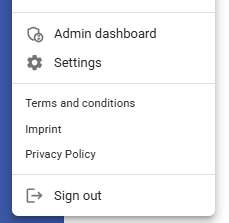
- Go to Admin dashboard
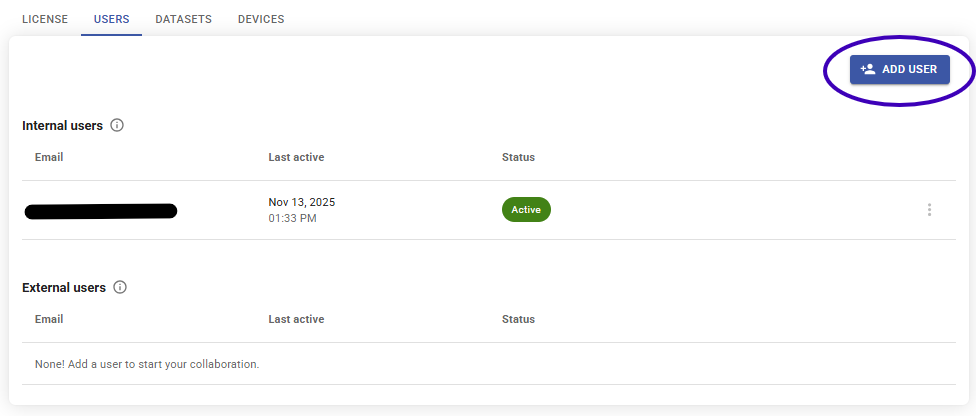
- Go to "Users", click "Add user" and enter the invitee's email address. By default the external user has no access to any of your datasets
- Go to "Datasets" of admin dashboard, click the "Manage access rights" icon of the dataset that you want to share. Enable the "Access" checkbox of the user that you want to share the dataset with.
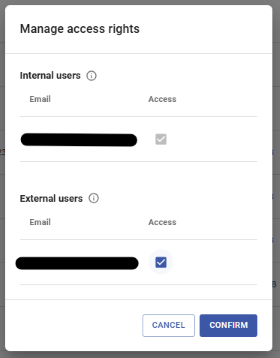
- Click confirm. Your external user can now access the dataset!
Dark mode
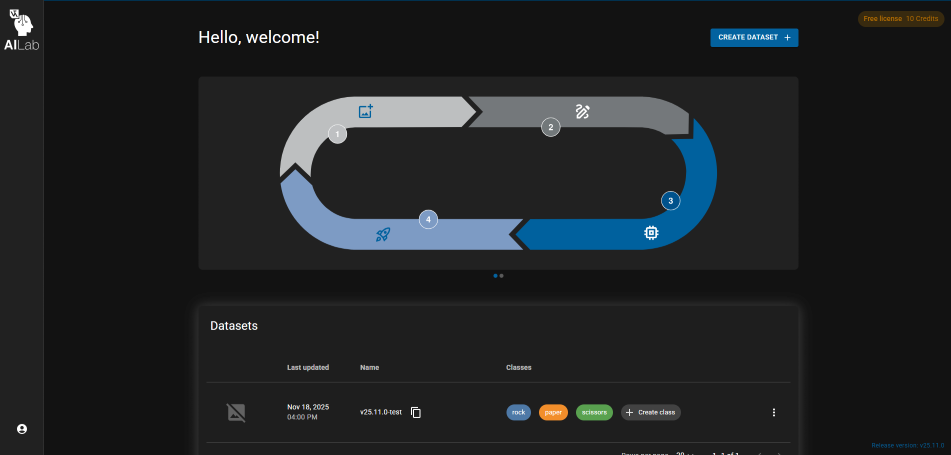
Enable dark mode from your settings to reduce eye strain and keep the interface comfortable during late-night sessions.
As usual, we have also included bugfixes, performance improvements and security updates. We hope you enjoy the new features and improvements!